With an SSH key you log in without typing a password, and if you also disable passwords, the bots trying combinations against your server have nothing left to guess.
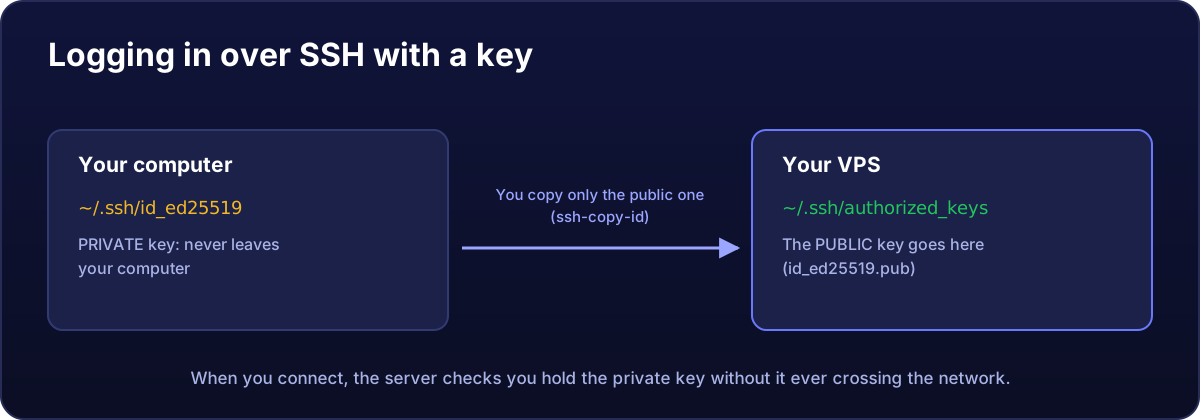
1. Create your key (on your computer)
Windows 10/11, Mac and Linux include SSH. Open a terminal (on Windows, PowerShell) and type:
ssh-keygen -t ed25519Press Enter to save it in the default place and, if you like, set a passphrase. Two files are created in your user's .ssh folder: id_ed25519 (private: never share it) and id_ed25519.pub (public).
2. Upload it to the server
From Mac or Linux:
ssh-copy-id root@203.0.113.10From Windows (PowerShell):
type $env:USERPROFILE\.ssh\id_ed25519.pub | ssh root@203.0.113.10 "mkdir -p ~/.ssh && cat >> ~/.ssh/authorized_keys && chmod 700 ~/.ssh && chmod 600 ~/.ssh/authorized_keys"It asks for the password one last time.
3. Test it
ssh root@203.0.113.10If it logs you in without asking for the server password, it works. Do not go on to step 4 if it did not.
4. Disable SSH passwords
With the previous session still open (just in case), on the server:
echo "PasswordAuthentication no" > /etc/ssh/sshd_config.d/00-keys-only.conf
sshd -t && systemctl restart ssh
On Rocky Linux 8, change the PasswordAuthentication line to no directly in /etc/ssh/sshd_config; the service is called sshd: systemctl restart sshd.
The file name starts with 00- on purpose: in SSH the first value read wins, and some images ship another file that re-enables passwords.
Open another terminal and check you can still log in with the key before closing the first.
If you lose the key
The panel's VNC console does not use SSH, so the password still works there. If you do not remember it, generate a new one under Settings → Request Password Reset, log in over VNC and add your new key to /root/.ssh/authorized_keys.
For file transfers (WinSCP, FileZilla), use the same private key: how to upload files.