For a Minecraft Java server we recommend Paper: players join with the normal game, without installing anything, it performs much better than Mojang's official server and it supports plugins.
1. Install the right Java version
| Minecraft version | Java |
|---|---|
| 26.1 and later (the new 2026 numbering) | Java 25 |
| 1.20.5 – 1.21.x | Java 21 |
| 1.18 – 1.20.4 | Java 17 |
If start-up shows UnsupportedClassVersionError or a message saying you need another Java, this is why.
Windows
Download the Eclipse Temurin .msi installer for the version you need from adoptium.net. During setup, enable Set JAVA_HOME and Add to PATH. Check it in a new console with java -version.
Linux (Ubuntu / Debian)
Adoptium's official repository has every version:
apt install -y wget apt-transport-https gpg
wget -qO - https://packages.adoptium.net/artifactory/api/gpg/key/public | gpg --dearmor | tee /etc/apt/trusted.gpg.d/adoptium.gpg > /dev/null
echo "deb https://packages.adoptium.net/artifactory/deb $(awk -F= '/^VERSION_CODENAME/{print$2}' /etc/os-release) main" | tee /etc/apt/sources.list.d/adoptium.list
apt update
apt install -y temurin-25-jdk
java -version
Change 25 to 21 or 17 if your Minecraft version needs it.
2. Download Paper
On papermc.io/downloads/paper pick the version and copy the download link (right-click the button). On Linux, better with a dedicated user:
adduser --disabled-password --gecos "" minecraft
su - minecraft
mkdir ~/server && cd ~/server
wget -O paper.jar "PASTE_THE_LINK_HERE"
On Windows, download it with the VPS's browser and save it as C:\minecraft\paper.jar.
3. First start and the EULA
From the server folder:
java -Xms2G -Xmx2G -jar paper.jar --noguiThe first time it stops straight away because you must accept Minecraft's EULA: open eula.txt, change eula=false to eula=true, save and start again. When the console shows Done, the world is ready.
4. How much memory to give it
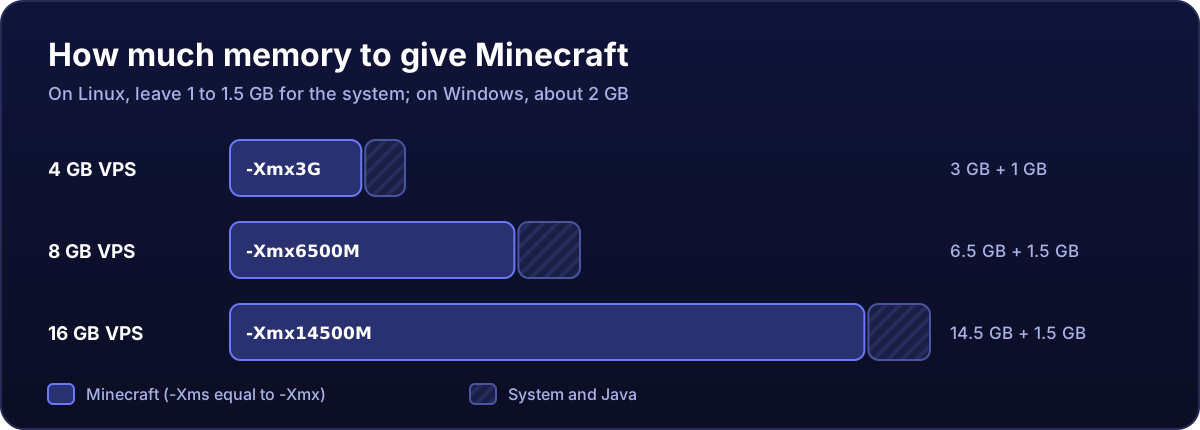
Set the same value for -Xms and -Xmx and leave 1 to 1.5 GB for the system on Linux (about 2 GB on Windows). On an 8 GB Linux VPS, for example: -Xms6500M -Xmx6500M. Giving it all the RAM is worse: the system runs out of memory and the server stutters or gets killed.
The full command with the performance options Paper recommends is in optimising your Minecraft server.
5. Basic settings
With the server stopped, edit server.properties:
| Setting | What for |
|---|---|
motd | The text shown in the server list |
max-players | Players at once |
difficulty / gamemode | Difficulty and game mode |
view-distance / simulation-distance | How much world is visible and how much "runs" around each player; lowering them is what relieves the server most |
online-mode | Keep it true: it checks every player owns the game. With false, anyone can join under someone else's name, including your admin one |
To let in only the people you choose, use the whitelist from the console: whitelist on and whitelist add Name.
6. Open port 25565 (TCP)
# Windows (PowerShell as administrator)
New-NetFirewallRule -DisplayName "Minecraft TCP 25565" -Direction Inbound -Protocol TCP -LocalPort 25565 -Action Allow -Profile Any

# Linux
ufw allow 25565/tcp
On Spain servers, also apply the Minecraft Java filter in the Security tab. Full details in the Minecraft ports guide.
7. Make yourself admin and join
In the server console type op YourName. In the game: Multiplayer → Add Server and enter your VPS's IP (no port needed if you use 25565).
8. Keep it running by itself
On Windows, create C:\minecraft\start.bat with your command and make it start with Windows:
@echo off
cd /d C:\minecraft
java -Xms6G -Xmx6G -jar paper.jar --nogui
pause
On Linux, keep it in a screen session or turn it into a service (Paper saves the world when it gets the stop signal). And schedule world backups: it is the one thing you cannot download again.