Your VPS is paid in advance and renews at the end of each period (monthly, quarterly, every six months or yearly, depending on your cycle). These are the deadlines the panel applies:
Step by step
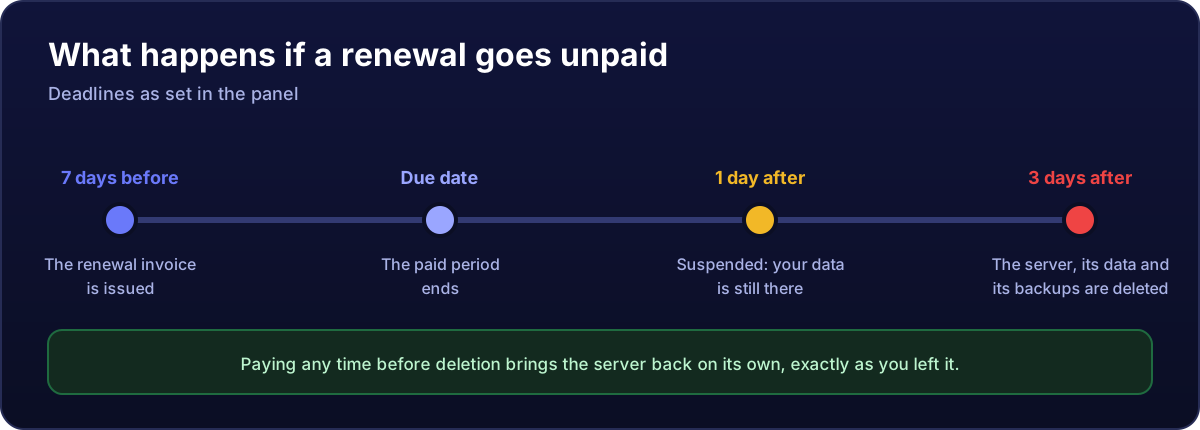
- 7 days before the due date the renewal invoice is created and emailed to you. You will find it under Invoices.
- On the due date the paid period ends. The server keeps running.
- 1 day after, if still unpaid, the service is suspended: the server is switched off, but your data is still there.
- 3 days after the due date, the server is deleted with its data and backups. There is no way back from this.
If you have been suspended
Pay the pending invoice from Invoices and the server reactivates by itself, exactly as you left it, as soon as the payment clears. No ticket needed.
Paying early never costs you days
The renewal counts from the due date, not from the day you pay. If you pay the invoice 6 days early, you do not lose those 6 days: the new period starts when the current one ends.
So you do not have to keep an eye on it
- Automatic payment: save a payment method in your account and link it to the service; renewals will be charged automatically. See how to pay and automatic payment.
- Longer cycles: paying quarterly, six-monthly or yearly means fewer invoices and a lower monthly price. See how to change the cycle.
- Make sure the emails reach you: add our sender to your contacts so invoices do not end up in spam.
And for a new order
If you place an order and do not pay it, the invoice stays pending and the order is cancelled after 7 days. You can order again whenever you like.
Not renewing? Better cancel it at the end of the period and take your data off first: that way you stop getting reminders.